
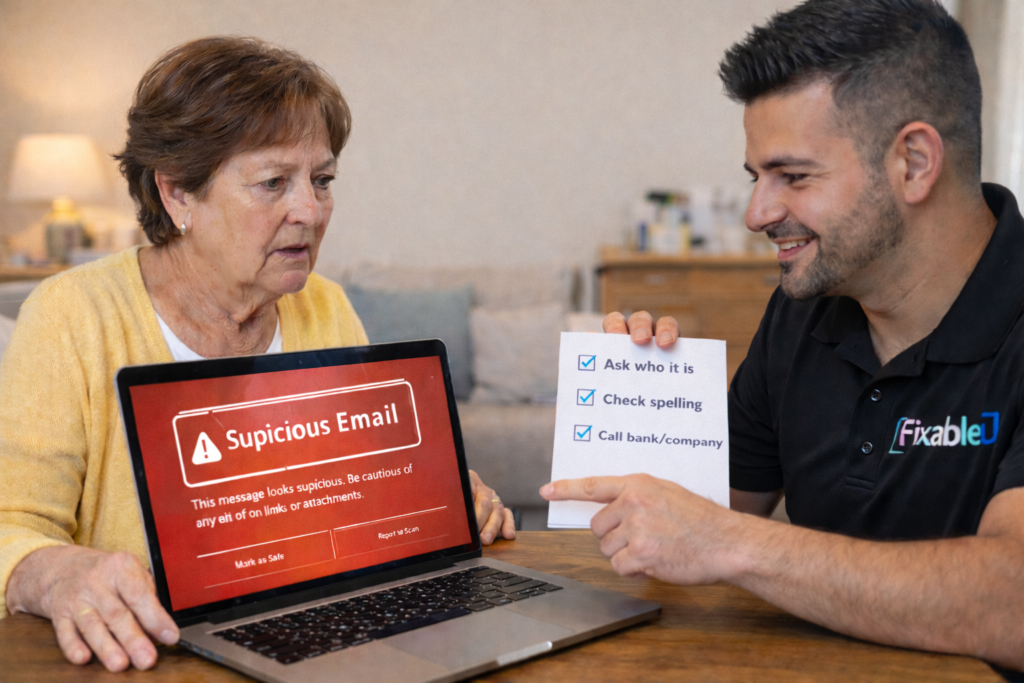
According to ACCC Scamwatch data, Australians over 65 consistently lose more money to scams than any other age group. This is not because seniors are less intelligent — it’s because scammers specifically design their approaches to target the circumstances, communication styles, and trust levels of older people. Understanding how scammers think, and what they actually send, is far more useful than generic “be careful online” advice.
This guide is written for Melbourne seniors, their adult children, and carers. It covers the specific scams in circulation right now, the practical habits that prevent them, and — importantly — how to talk about this with a parent without making them feel incapable or anxious about technology they rely on for connection and independence.
Why seniors are specifically targeted — and why it’s not about intelligence
Scammers don’t target seniors because they’re less intelligent. They target seniors because of specific circumstances that create vulnerability:
Circumstances scammers exploit
- More likely to be home and answer calls/emails
- Grew up in era of greater institutional trust
- Less familiar with how institutions actually communicate digitally
- More likely to have superannuation/savings
- Often isolated — less likely to have someone to check with
Scammer tactics that work on everyone
- Creating urgency — “act now or lose access”
- Creating fear — “your account has been compromised”
- Creating authority — impersonating ATO, banks, Medicare
- Creating opportunity — “you’ve received a refund”
- Bypassing rational thinking through emotion
The key point: scam success has nothing to do with intelligence and everything to do with context. Security researchers have shown that under sufficient urgency and authority framing, intelligent, well-educated people click on things they’d otherwise immediately recognise as suspicious. This is important when having the conversation with a senior parent — the framing matters enormously.
The 6 email scams most common in Melbourne right now
1. ATO / MyGov impersonation
What it looks like: An email claiming to be from the Australian Taxation Office or MyGov saying you have a tax refund waiting, or that there’s an issue with your tax return. Often includes a blue button saying “Claim your refund” or “Verify your account.” The email may include your name and partial address to appear legitimate.
The tell: The real ATO and MyGov never email you to say you have a refund — you find out by logging into myGov directly. They also never ask you to click a link in an email to access your account. Any tax refund message in your email is a scam. Check the ATO’s current scam alerts page for examples.
2. Australia Post / parcel delivery scam
What it looks like: An email (or SMS) from “Australia Post” saying a parcel couldn’t be delivered and you need to reschedule delivery by clicking a link and paying a small fee ($2–$5). The link goes to a fake page designed to steal your card details.
The tell: Australia Post will never ask for card payment via email or SMS to redeliver a parcel. Actual Australia Post notifications go via the myPost app or a card left in your letterbox. The “small fee” is designed to seem trivial so you don’t think twice — but the real aim is your card number.
3. Fake bank security alert
What it looks like: An email from “Commonwealth Bank,” “ANZ,” “NAB,” or “Westpac” saying there’s been suspicious activity on your account and you need to verify your details immediately. The email looks exactly like the bank’s real emails — correct logo, colours, layout. The link goes to a fake login page that captures your internet banking credentials.
The tell: Your bank already knows your details — they never email asking you to “verify” them. If you’re ever concerned about your bank account, call the number on the back of your card or log in by typing your bank’s address in the browser yourself (not by clicking a link).
4. NBN / Telstra service termination scam
What it looks like: An email claiming your NBN or Telstra service will be terminated unless you verify your account or pay an outstanding bill. Often includes a countdown timer to create urgency. Some versions also call you by phone first, then follow up with an email.
The tell: Telstra and NBN Co always give significant notice before any service termination — they don’t send single urgent emails. Any billing issue appears in your actual Telstra account at my.telstra.com.au, not via a link in an email. This scam is particularly effective because NBN-related problems feel urgent and technical.
5. Fake subscription renewal (McAfee, Norton, Microsoft)
What it looks like: An invoice-style email saying your McAfee, Norton, or Microsoft 365 subscription has auto-renewed for $299–$499 and will be charged to your account. It includes a phone number to call to cancel. When you call, they walk you through giving remote access to your computer.
The tell: This is a variant of the tech support scam covered in our virus removal guide. Do not call the number in the email. Check your actual subscription status by logging into the service directly at their real website. If you don’t have a subscription, the email is definitely fake.
6. Family/grandchild emergency scam
What it looks like: An email or message claiming to be from a grandchild or family member who is in trouble — “I’ve lost my phone and wallet overseas, I need you to transfer money urgently, don’t tell Mum and Dad.” The message is designed to bypass logical checks by appealing to love and urgency simultaneously.
The tell: Establish a family code word for emergencies — something only real family members know. If a message claiming to be from a family member doesn’t include the code word, call them directly on their known number before responding to the message. Never transfer money based on an email or message alone without voice or video confirmation.
How to spot a scam email — a practical checklist
These checks take 30 seconds and will catch the majority of scam emails. Teaching a senior parent or client these habits — not as abstract rules but as specific things to actually look at — is the most effective protection available.
-
1
Look at the sender’s email address — not just the name
The display name might say “Commonwealth Bank” but click on it and the actual address might be something like
noreply@secure-bank-alert.com. Real bank emails come from their actual domain (e.g. @commbank.com.au). Any email address that doesn’t match the claimed company is a scam. -
2
Hover over links before clicking
On a computer, move the mouse over a link without clicking — the actual web address appears in the bottom-left corner of the browser. If a link claims to go to commbank.com.au but the address shows something different, don’t click. On a phone or tablet, press and hold the link to see the destination address.
-
3
Ask: was I expecting this?
Most scam emails arrive unexpectedly. If you didn’t request a password reset, you shouldn’t be receiving one. If you didn’t order anything, you shouldn’t be getting a delivery notification. Unexpected communications from institutions, even if they look real, deserve extra scepticism.
-
4
Notice urgency language — it’s a deliberate tactic
Phrases like “Act immediately,” “Your account will be closed in 24 hours,” “Final notice,” or “Urgent action required” are designed to stop you from thinking clearly. Real institutions give you time. If an email is creating intense urgency, that’s a red flag, not a reason to comply.
-
5
When in doubt — go directly, don’t click
If an email from your bank says there’s an issue, don’t click the link — open a new browser tab and type your bank’s address directly. If an email from ATO says you have a refund, don’t click — go to my.gov.au by typing it yourself. This single habit neutralises virtually all phishing scams.
What to do if a senior has already clicked or responded
Don’t panic — and don’t make the person feel bad about it. The response depends on what they did:
They clicked a link but didn’t enter any information
Low risk, but worth checking. Run a Windows Security scan (search “Windows Security” → Quick scan). Check the computer for any unusual new programs or browser extensions. Change the email password as a precaution. See our virus removal guide for a complete check.
They entered their email login details on a fake page
Change the email password immediately from a different device (phone on mobile data if possible). Enable two-factor authentication. Check recovery details in the account settings. See our hacked email guide for the full step-by-step process. Also change the password on any other account that uses the same email/password combination.
They entered banking or card details
Call the bank immediately — the fraud number is on the back of the card. Ask them to freeze the account or card and monitor for unusual transactions. File a report with ACCC Scamwatch. Contact IDCARE on 1800 595 160 — Australia’s national identity and cyber support service. Banks take these reports seriously and can reverse fraudulent transactions in many cases.
They gave someone remote access to the computer
This is the most serious scenario. Disconnect from the internet immediately. Call the bank. Change passwords on all important accounts from a different device. See the urgent remote access section in our virus removal guide for the complete step-by-step response. Get the computer professionally checked before using it for banking again.
Setting up spam and phishing filters properly
Email providers have built-in spam and phishing detection that can be configured to catch more scams before they reach the inbox. These settings are off or under-configured by default.
Gmail
Gmail has strong spam filtering by default, but you can improve it further: open Gmail → cog icon (Settings) → See all settings → Filters and Blocked Addresses. If you’re receiving recurring scam emails from the same sender, select one → click “Block [sender name].” Also ensure “Enhanced Safe Browsing” is on in Chrome settings — this specifically warns when Gmail links go to known phishing sites.
Outlook / Hotmail
In Outlook.com: Settings → Mail → Junk email → Filters → set to “Standard” protection (this specifically enables phishing protection beyond basic spam). Also check that “Safe links” is enabled if you have a Microsoft 365 subscription — this scans links in emails in real time before you land on the page.
General — mark scam emails as phishing, not just spam
When you receive a scam email, don’t just delete it — report it as phishing. In Gmail: open the email → click the three dots (⋮) → “Report phishing.” In Outlook: select the email → click “Junk” → “Phishing.” This trains the spam filter and helps protect other users from the same scam. It takes 5 seconds and makes a meaningful difference.
How to talk about scams with a senior parent — what works and what doesn’t
This section is for adult children and carers. The way you have this conversation matters as much as the information itself.
❌ What doesn’t work
- “You just need to be more careful online”
- “I don’t know why you clicked that”
- “These scammers are so obvious”
- Showing frustration after they’ve been scammed
- Suggesting they stop using technology
These responses create shame and reduce the likelihood they’ll tell you next time something happens — which is the worst outcome.
✅ What works
- Share specific examples of scam emails you’ve received
- “These are designed by professional criminals to fool everyone”
- Give a simple rule: “Call me before clicking anything that asks for money”
- Set up a family emergency code word
- Praise them specifically when they correctly identify a scam
The goal is for them to feel comfortable calling you or asking before acting — not to feel watched or judged.
If you’d like us to cover scam awareness during a home IT visit — for senior IT support or a new computer setup — we include a plain-English scam awareness walkthrough as part of the visit. Many families find it useful to have a technician cover this directly with the senior, as coming from a third party sometimes lands differently than the same advice from a family member.
Frequently asked questions
It depends on what she did after clicking. If she clicked the link but immediately closed it without entering any information, the risk is low — but worth a quick scan with Windows Security. If she saw a page that asked for a login or payment details, even if she says she didn’t enter anything, it’s worth a closer check. Phishing pages sometimes use pre-filled forms or other techniques. If you’re not sure, a home visit with a proper check is the safest option. See our virus removal guide for what to check.
Windows Defender (built in, free) and Gmail/Outlook’s built-in phishing detection catch the majority of scam emails automatically. Adding a reputable browser extension like Google Safe Browsing (enabled by default in Chrome) provides additional link scanning. What no software can fully replace is the human awareness — someone who knows the “go directly, don’t click” habit will stop scams that bypass technical filters. The combination of reasonable technical protection plus the checklist habits above is the most effective approach. We don’t recommend paying for additional antivirus for most home users.
Three places: (1) Report it as phishing in your email client (Gmail or Outlook, as described above) — this directly improves scam detection for other users. (2) Forward the email to the organisation being impersonated — banks and the ATO have scam reporting email addresses. (3) Report to ACCC Scamwatch at scamwatch.gov.au/report-a-scam — this contributes to Scamwatch’s intelligence on current scam campaigns.
Yes — we include email security and scam awareness as part of our senior IT support visits. We check email security settings, configure spam filters, walk through the scam recognition checklist with the senior directly (at their pace, with plain-English explanations), and provide a simple written reference guide for their specific email provider. Family members can book on behalf of a parent. $89/hr, no call-out fee, all Melbourne suburbs. Call 0435 955 429.
Want us to cover scam protection during a home visit?
We walk through the scam recognition checklist directly with your parent, configure email security settings, and leave a written reference guide. Family members can book on behalf of a parent. $89/hr, no call-out fee, all Melbourne suburbs.
Related guides
Serving all Melbourne suburbs — Doncaster, Camberwell, Box Hill, Glen Waverley, Kew, Hawthorn, Balwyn, Ringwood and all surrounding areas. View all service areas →
About Fixable: Friendly, patient on-site IT support for seniors across all Melbourne suburbs. NDIS Worker Screening cleared. We include scam awareness in every senior support visit — always in plain English, always at their pace. Call 0435 955 429 or visit fixable.au