Need help connecting printer to new computer Melbourne? Learn common setup issues, safe steps to try, and how in-home IT support makes it simple.
Why Printers Stop Working After Getting a New Computer
Getting a new computer is exciting — until the printer suddenly won’t connect.
Across homes in Melbourne, this is one of the most common problems after upgrading a laptop or desktop. The printer worked perfectly before, but now:
-
The computer can’t find it
-
It shows “offline”
-
Drivers won’t install
-
It connects but won’t print
The good news is that printers usually don’t need replacing — they just need to be configured correctly for the new device.
Why Connecting a Printer to a New Computer Can Be Tricky
Printers rely on:
-
Correct drivers
-
Proper Wi-Fi setup
-
Network recognition
-
Updated software
-
Matching printer and computer settings
When you change computers, the printer doesn’t automatically reconnect the same way it did before.
This is especially confusing for seniors, who may not know whether the issue is with the printer, the Wi-Fi, or setting up a new computer.
Common Printer Setup Problems After Upgrading
Many people experience:
-
“Printer not detected” errors
-
Wireless printer not connecting
-
USB printer not recognised
-
Old drivers incompatible with Windows updates
-
Printer working but scanner not detected
-
Multiple printer copies listed
These problems are very common — especially on older printers.
Safe Things You Can Try First
Before arranging help, you can try:
-
Restarting the printer and computer
-
Checking Wi-Fi connection
-
Making sure the printer is on the same network
-
Avoiding installing multiple driver versions
-
Removing old duplicate printers
If things still don’t work, it’s best not to keep reinstalling random software, as that can make troubleshooting harder.
How In-home IT Support Makes Printer Setup Easy
A technician providing IT support for seniors Melbourne can:
-
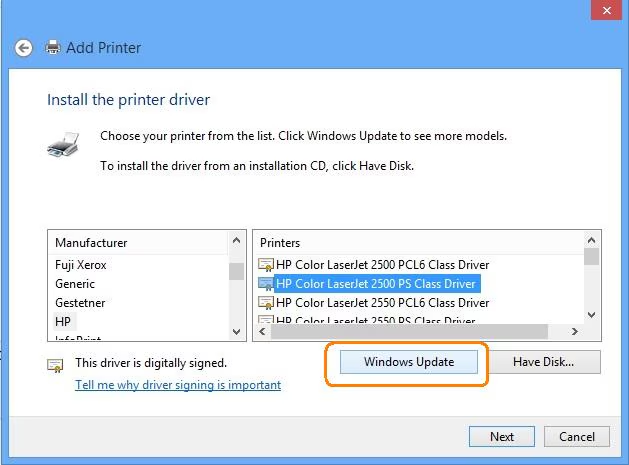
Install the correct printer drivers
-
Connect the printer to the new computer properly
-
Configure scanning functions
-
Remove duplicate or broken printer entries
-
Test printing before leaving
👉 This is where On-site IT support Melbourne makes a real difference — everything is set up correctly in your home environment.
When You Should Call for Professional Help
You should arrange in-home support if:
-
The printer says “offline” constantly
-
You’ve tried reinstalling but nothing works
-
The scanner function won’t connect
-
You’ve recently upgraded computers
-
You don’t want to risk misconfiguring settings
Early setup prevents weeks of frustration.
Pricing Expectations in Melbourne
Typical pricing for printer setup includes:
-
Call-out + first hour: $120–$160
-
Additional time: $30–$50 per 30 minutes
Most printer connection issues are resolved in one visit.
Frequently Asked Questions
Do I need a new printer for a new computer?
Usually no — most printers can be reconnected.
Why does my printer show offline?
It’s often a network or driver issue.
Can older printers still work with new computers?
Often yes, depending on driver support.
Can scanning be set up at the same time?
Yes, both printing and scanning can be configured together.
Is in-home IT support safe for seniors?
Yes, reputable providers offer patient, face-to-face help.
Is connecting printer to new computer Melbourne a common issue?
Yes. Connecting printer to new computer Melbourne is a frequent request after device upgrades.
Conclusion
A new computer shouldn’t mean replacing your printer. If you need help connecting printer to new computer Melbourne, professional in-home IT support can configure everything correctly, test it properly, and make sure printing and scanning work smoothly from day one.
Many Melbourne families trust Fixable for calm, reliable in-home tech help.