OneDrive not syncing Melbourne? Learn common causes, safe steps to try, and how in-home IT support can restore file syncing safely.
Why OneDrive Suddenly Stops Syncing
OneDrive is designed to keep your files safely backed up and synced between devices. But when it stops syncing, it can cause confusion and concern — especially for seniors and families who rely on it for photos and documents.
Across homes in Melbourne, many people notice problems such as:
-
Files not updating
-
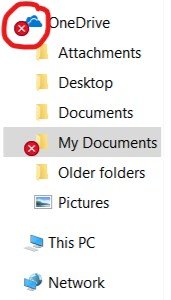
Red “X” or warning icons
-
Documents missing
-
Sync paused unexpectedly
-
Storage limit warnings
The good news? Most OneDrive sync issues are fixable.
Common Reasons OneDrive Stops Syncing
OneDrive syncing problems are often caused by:
-
Internet connection issues
-
Microsoft account login problems
-
Outdated OneDrive app
-
Storage limit reached
-
File name conflicts
-
Large files failing to upload
-
Windows updates changing settings
For seniors, the challenge is understanding whether the problem is:
-
Internet-related
-
Account-related
-
Device-related
-
Or simply a settings issue
Safe Things You Can Try First
Before arranging help, you can try:
-
Checking your internet connection
-
Restarting the computer
-
Signing out and back into OneDrive
-
Confirming your Microsoft 365 subscription is active
-
Checking available storage space
If syncing still doesn’t work properly, it’s best not to repeatedly reset settings without guidance.
Why OneDrive Problems Can Be Risky
When OneDrive isn’t syncing correctly, it can lead to:
-
Files not being backed up
-
Documents missing from new computers
-
Duplicate files
-
Version conflicts
-
Accidental overwriting
This is especially concerning if important documents or family photos are involved.
How In-home IT Support Fixes OneDrive Properly
A technician providing IT support for seniors Melbourne can:
-
Check account login status
-
Repair OneDrive sync settings
-
Resolve file conflicts
-
Ensure cloud backup is working
-
Clean up duplicate folders
-
Confirm files are safely stored
-
Explain how syncing works in simple terms
👉 This is where On-site IT support Melbourne makes a big difference — everything is checked in your home, step by step.
When You Should Arrange Professional Help
You should consider in-home support if:
-
Files are missing
-
OneDrive shows constant error messages
-
Sync icons stay stuck
-
You recently upgraded computers
-
You’re unsure whether files are safely backed up
Early help prevents accidental data loss.
Pricing Expectations in Melbourne
Typical pricing for OneDrive troubleshooting includes:
-
Call-out + first hour: $120–$160
-
Additional time: $30–$50 per 30 minutes
Most syncing issues are resolved in one visit.
Frequently Asked Questions
Will I lose my files if OneDrive isn’t syncing?
Not necessarily, but it should be checked promptly.
Can OneDrive be repaired without losing data?
Yes, most sync issues can be fixed safely.
Is OneDrive included in Microsoft 365?
Yes, it is part of the subscription.
Can syncing be set up on multiple devices?
Yes, files can sync across laptops, phones, and tablets.
Is in-home IT support safe for seniors?
Yes, reputable providers offer patient, face-to-face help.
Is OneDrive not syncing Melbourne a common issue?
Yes. OneDrive not syncing Melbourne is a common concern after new computer or Microsoft 365 setup.
Conclusion
OneDrive is designed to protect your important files — but when it stops syncing, it needs proper attention. If you’re experiencing OneDrive not syncing Melbourne, professional in-home IT support can restore your sync settings, confirm your files are safe, and ensure everything works reliably again.
Many Melbourne families trust Fixable for calm, reliable in-home tech support.