
Need help with NBN setup at home Melbourne? Learn what’s involved, common problems, pricing expectations, and when in-home IT support is the easiest option.
Why NBN Setup at Home Can Be Confusing
Setting up the NBN at home is meant to be straightforward, but for many seniors, carers, and busy families it quickly becomes confusing. Modems, connection boxes, Wi-Fi networks, and different instructions can make it hard to know what to plug in and where.
Across homes in Melbourne, NBN setup issues are very common—especially when:
The home has recently changed internet providers
Equipment has been upgraded
Multiple devices need to connect
The good news is that most NBN setup problems are not faults, but simple configuration issues.
What Is Involved in NBN Setup at Home
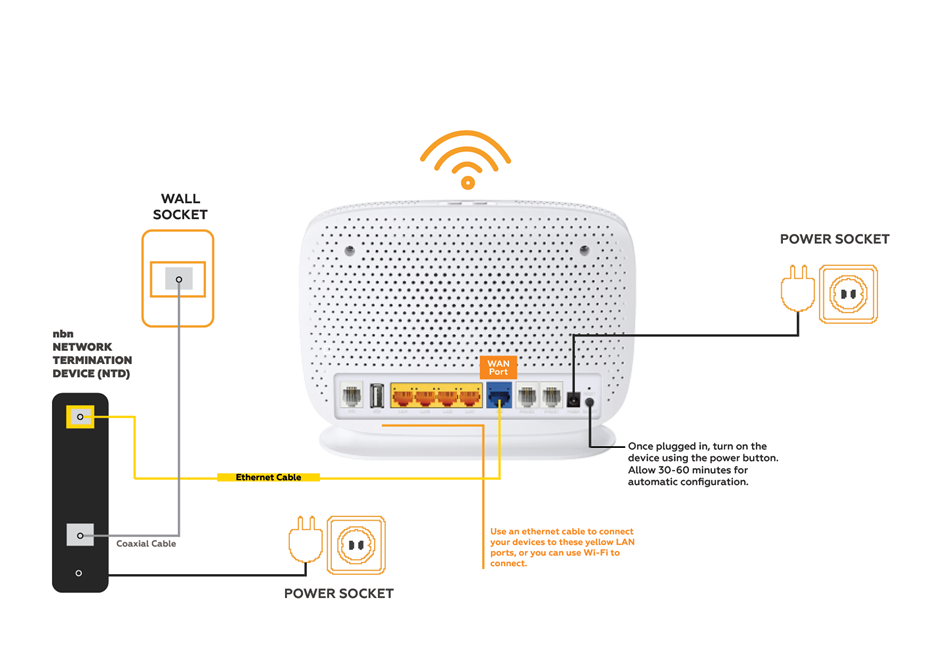
A typical NBN setup includes:
Connecting the NBN connection box (if applicable)
Setting up the modem/router
Configuring Wi-Fi correctly
Connecting computers, phones, TVs, and printers
For seniors, the challenge is that instructions often assume technical knowledge and move too quickly.
Common Problems During NBN Setup
Many households experience issues such as:
Internet light on, but no connection
Wi-Fi working in some rooms but not others
Devices connecting but no internet access
Slow speeds after setup
Old modem not compatible with NBN
Confusion between NBN box and modem
These problems can happen even when the NBN itself is working correctly.
Safe Things You Can Check First
Before arranging help, there are a few safe checks you can try:
Make sure all cables are firmly connected
Restart the modem once
Check that the Wi-Fi name and password are correct
Try connecting one device at a time
If things still don’t work properly, it’s best not to keep guessing, as incorrect settings can cause ongoing issues.
Why DIY NBN Setup Often Doesn’t Last
Many people manage to “get it working” briefly, only to experience:
Dropouts
Slow speeds
Devices disconnecting
Wi-Fi problems in bedrooms or studies
This usually happens because the setup wasn’t optimised for the layout of the home or the number of devices using the connection.
How In-home IT Support Helps With NBN Setup
A professional technician providing IT support for seniors Melbourne can:
Correctly configure the NBN modem and router
Optimise Wi-Fi coverage throughout the home
Connect all required devices properly
Fix slow speeds and dropouts
Explain everything in plain English
👉 This is where On-site IT support Melbourne is especially helpful, because the setup is done in your home, not over the phone.
What to Expect During an NBN Setup Visit
During an in-home visit, you can expect:
NBN and modem check
Correct setup and configuration
Wi-Fi testing in different rooms
Devices connected and tested
Clear explanation before the technician leaves
This calm, face-to-face approach is ideal for seniors and families.
Pricing Expectations in Melbourne
Typical pricing for in-home NBN setup includes:
Call-out + first hour: $120–$160
Additional time: $30–$50 per 30 minutes
Most NBN setups are completed in one visit.
When You Should Call a Professional
You should consider in-home IT support if:
NBN setup instructions are confusing
Internet works but Wi-Fi is unreliable
Multiple devices need connecting
You want it done properly the first time
Early help avoids weeks of frustration.
Frequently Asked Questions
Usually no — they provide the connection, not full home setup.
Sometimes, depending on the connection type.
Yes, proper placement and configuration make a big difference.
Yes, reputable providers offer patient, face-to-face support.
Most visits take 60–90 minutes.
Yes. NBN setup at home Melbourne is one of the most common reasons people book in-home IT support.
Conclusion
NBN setup doesn’t need to be stressful. If you’re organising NBN setup at home Melbourne, professional in-home IT support can ensure everything works correctly, explain the setup clearly, and provide reliable internet throughout your home.
Many Melbourne households trust Fixable for calm, reliable in-home tech help.
Helpful Technology Guides
Computer Running Slow Melbourne
Wireless Printer Setup Melbourne
Slow Internet Speeds at Home Melbourne
Help Removing Computer Virus Melbourne
Areas We Service
Fixable provides in-home computer help across Melbourne suburbs including Brighton, Camberwell, Balwyn, Kew, Doncaster, Glen Waverley, Hawthorn and surrounding areas.